How YouTube Works: The Role of Resumable Uploads, DAG Processing, and Adaptive Streaming
Hi I am Krupa! I’m a Full-Stack Developer focused on building secure, scalable web applications with Java, JavaScript/TypeScript, and Node.js. I take pride in solving challenges like authentication and Single Sign-On. Off work, I’m a 2× marathon finisher and avid photographer, always seeking new adventures.
Uploading a 30GB video to YouTube without breaking the internet?
It’s not magic — it’s a combination of chunked uploads, resumable transfers, DAG-based processing, and adaptive bitrate streaming working seamlessly behind the scenes.
Let’s understand the terminologies, processes and services involved and break it down one by one.
1. Uploading Large Videos
Uploading massive videos is tricky. Users expect:
Progress indicators: so they know the upload is working.
Resumable uploads: so interrupted uploads don’t start over.
Challenges of single-request uploads
Timeouts: A 50GB upload over 100Mbps could take over an hour.
Browser & server limits: Many servers restrict single POSTs to <2GB.
Network failures: Large files are prone to interruptions.
Chunked & Resumable Uploads
Instead of sending the file in one go, YouTube splits the upload into small chunks — usually 5–10MB each — and uploads them separately.

🔄 Upload Flow
- Client Generates Fingerprints
Split the file into 5–10 MB chunks.
Each chunk gets a fingerprint hash (e.g., SHA-256).
The entire file also gets a fingerprint, which becomes the fileId.
Why?
Enables resumable uploads if the connection drops.
Prevents duplicate uploads if the same file is uploaded multiple times.
- Client Requests Upload Session
Client sends the file fingerprint to the backend.
Backend checks the DB for an existing upload session:
Existing session: returns which chunks are already uploaded.
New session: creates a chunks array in the DB, storing:
"chunks": [
  { "index": 0, "fingerprint": "abc123", "status": "not_uploaded" },
  { "index": 1, "fingerprint": "def456", "status": "not_uploaded" }
]
Metadata only — GCS/S3 is not contacted yet.
- Client Uploads Chunks Directly to Storage
Backend generates signed URLs (GCS) or pre-signed URLs (S3).
Client uploads chunks directly using these URLs.
After each chunk, client reports back:
Chunk index
Chunk fingerprint
Optional: ETag (S3) or checksum (GCS after full object upload)
This minimizes backend load while leveraging cloud storage scalability.
- Backend Verifies Chunks
Backend verifies uploaded chunks using:
Client reports (fingerprint + index)
Optional storage metadata checks:
S3: ListParts API or HEAD requests per chunk
GCS: resumable session info or final object checksum
DB is updated:
{ "index": 0, "fingerprint": "abc123", "status": "uploaded" }
- Resuming Interrupted Uploads
Client fetches the upload session from backend.
Only missing chunks are uploaded using the same signed URLs or resumable session.
2. Preprocessing / Transcoding
After the raw video lands in storage, it’s not immediately ready for viewers. To support any device, any network, YouTube needs to process it intelligently.
Video Basics
Video Codec – Compresses and decompresses video. Balances compression time, efficiency, quality, and device support. Examples: H.264, H.265, VP9, AV1.
Video Container – File format storing video, audio, and metadata. Determines how the file is stored, not how it’s compressed. Examples: MP4, MKV, MOV.
Bitrate – Number of bits transmitted per second (kbps/Mbps). Higher resolution/framerate → higher bitrate. Efficient codecs reduce file size without losing quality.
Transcoding: Creating multiple versions of the same video at different resolutions and bitrates, so devices can choose the optimal quality.
Transcoding DAG (Directed Acyclic Graph): Each node is a task, like “convert to 1080p @ 5Mbps.” The DAG ensures tasks run in parallel where possible, respecting dependencies, so your video gets ready faster.
Why It Matters
Imagine a user on a slow mobile connection trying to watch a 4K video. Without multiple resolutions and bitrates, they’d either buffer endlessly or be forced to download the massive 4K file. Transcoding ensures smooth, instant playback by preparing all options in advance.
Flow:
DAG Scheduling: The backend looks at the raw video and creates a graph of tasks for all needed resolutions/bitrates.
Tasks that don’t depend on each other can run in parallel, speeding up processing.
If a higher-resolution job fails, lower-resolution jobs can still complete.
Transcoding Versions: Each task outputs a version of the video:
1080p @ 5Mbps for desktops and high-speed networks
720p @ 3Mbps for standard devices
480p @ 1.5Mbps for mobile or slow networks
Segmentation: Each version is sliced into small chunks (2–10 seconds each). Why? Because this is the unit of streaming in Adaptive Bitrate Streaming. Smaller chunks mean faster switching between resolutions and less buffering.
Storage: Every transcoded version and segment is stored in cloud storage (GCS/S3), ready to be picked up by the manifest for streaming.
Optional Enhancements:
Keyframes & I-frames: Used to optimize seeking and reduce latency.
Thumbnails & Posters: Generated alongside video for previews.
Audio Streams: Separate audio tracks can be transcoded for multi-language support.

Outcome:
By the time the user hits “play,” YouTube already has all possible versions, pre-segmented, and ready for adaptive streaming. Thanks to the DAG, even huge videos finish preprocessing quickly, and global playback is seamless.
3. Adaptive Bitrate Streaming (ABS)
After preprocessing, videos are ready for streaming to users with different devices and network speeds. This is where Adaptive Bitrate Streaming (ABS) comes in.
What is ABS?
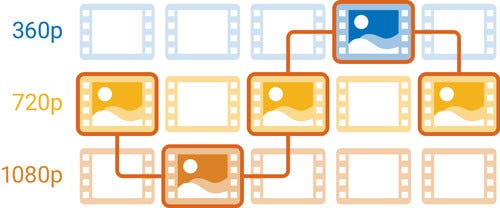
ABS dynamically adjusts video quality in real-time based on a user’s network speed and device capability. Instead of forcing a user to download a single large file, the player switches between different resolutions and bitrates seamlessly.
Manifest File
The manifest file (also called an index or playlist) is the “map” that tells the video player:
Which video versions are available (1080p, 720p, 480p, etc.)
Where to find each segment of each version
The duration of segments
Metadata like codecs, audio tracks, subtitles
Without the manifest, the player wouldn’t know how to fetch the right segment for the current network conditions.
Streaming Flow
Player Requests Manifest
When a user hits play, the video player fetches the manifest file for the video.Segment Selection
Based on the current network speed, the player selects the appropriate quality segment (e.g., 720p @ 3Mbps).Dynamic Switching
If network speed changes, the player switches to a higher or lower bitrate for the next segment, avoiding buffering.Parallel Playback
While one segment is playing, the next segment is being pre-fetched — ensuring continuous, smooth playback.
Why It Works
By combining preprocessed chunks with the manifest, ABS allows YouTube to:
Serve millions of users globally with varying network conditions
Minimize buffering and playback interruptions
Optimize bandwidth usage while maintaining video quality
Key Takeaway
Preprocessing + segmentation + manifest + ABS = a streaming experience that “just works” on any device, anywhere, even for huge videos.
Conclusion
Low-latency video upload and streaming is a complex, multi-layered system. The magic isn’t just fast servers — it’s careful orchestration of uploads, preprocessing, manifests, and ABS.
By breaking files into chunks, preprocessing with DAGs, and serving segments via adaptive streaming, YouTube ensures videos play smoothly and reliably, even for massive uploads.